Skip to content
Sprezzaturaby JamaisVulgaire

Style starts with what you have.

Your next outfit is already in your wardrobe.

Add a few pieces to your wardrobe, specify the occasion and request an outfit. Or upload a photo of what you are wearing: Style Rater explains what to keep and what to adjust.

You can also check what to wear with a potential purchase or which clothes to take on holiday.

A suggestion in the app

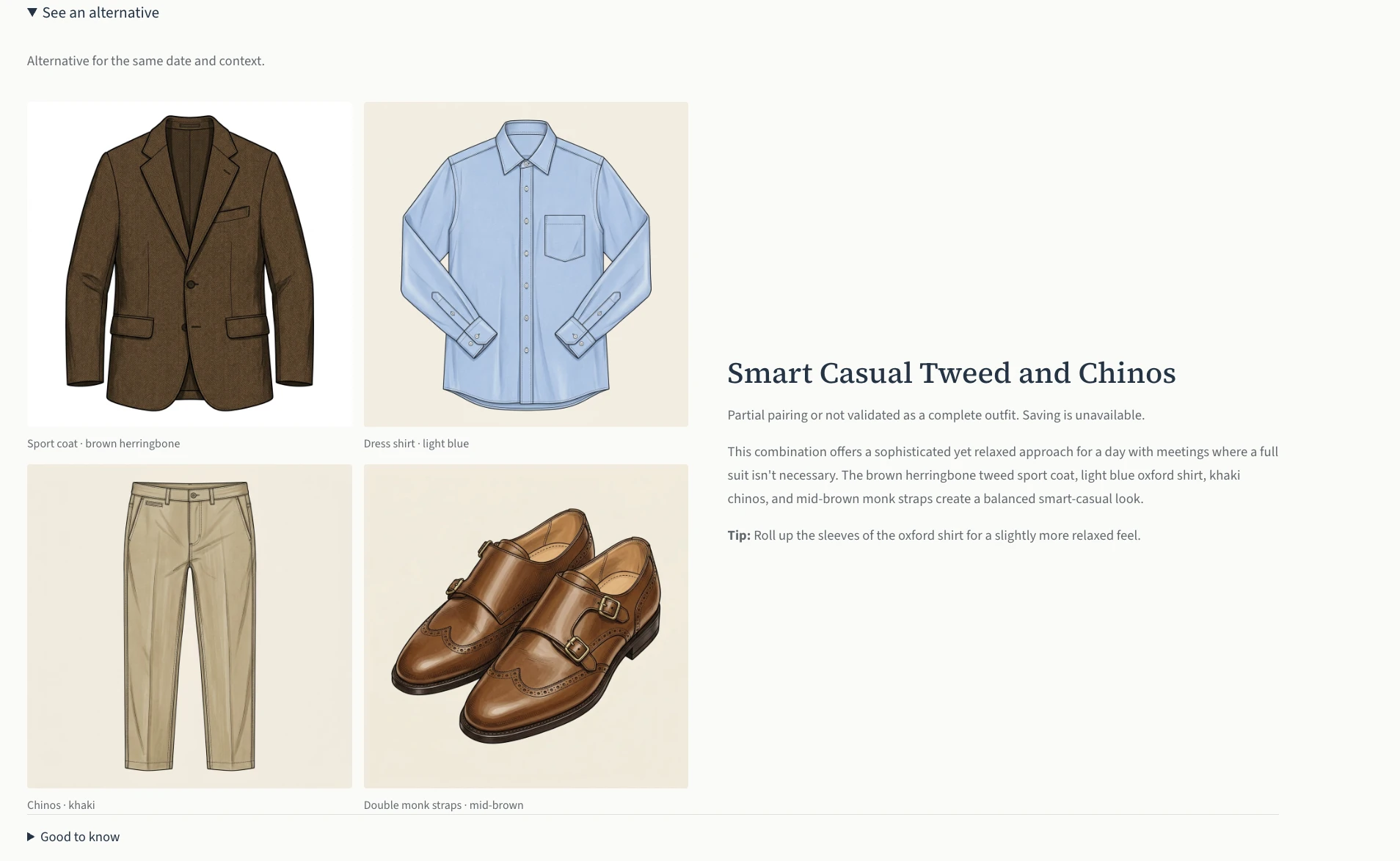
Outfit suggestion: brown tweed jacket, blue shirt, beige chinos and monk-strap shoes, with the context and accompanying advice.
Know what to wear with what you already own.

For a day of meetings without a suit, the app suggests these pieces and explains how to combine them. It does not, however, validate the suggestion as a complete outfit: you cannot save it as it stands.

App screenshots in English. Explanations in English; the clothing visuals are those shown in the account.

Outfit · Put an outfit together

Start with the pieces you wear often.

No need to digitise your entire wardrobe to get started.

  1. Save a few pieces

    Add at least three pieces to Wardrobe, from photos or the library. Start with those you wear often.

  2. Specify the occasion

    Office, dinner, weekend: choose today or tomorrow and adjust the context. Weather and calendar information can supplement it when available.

  3. See what to wear and why

    Click “Build my outfit”. You will see the pieces to wear together and the reasons for the choice. Nothing is generated when you open the page.

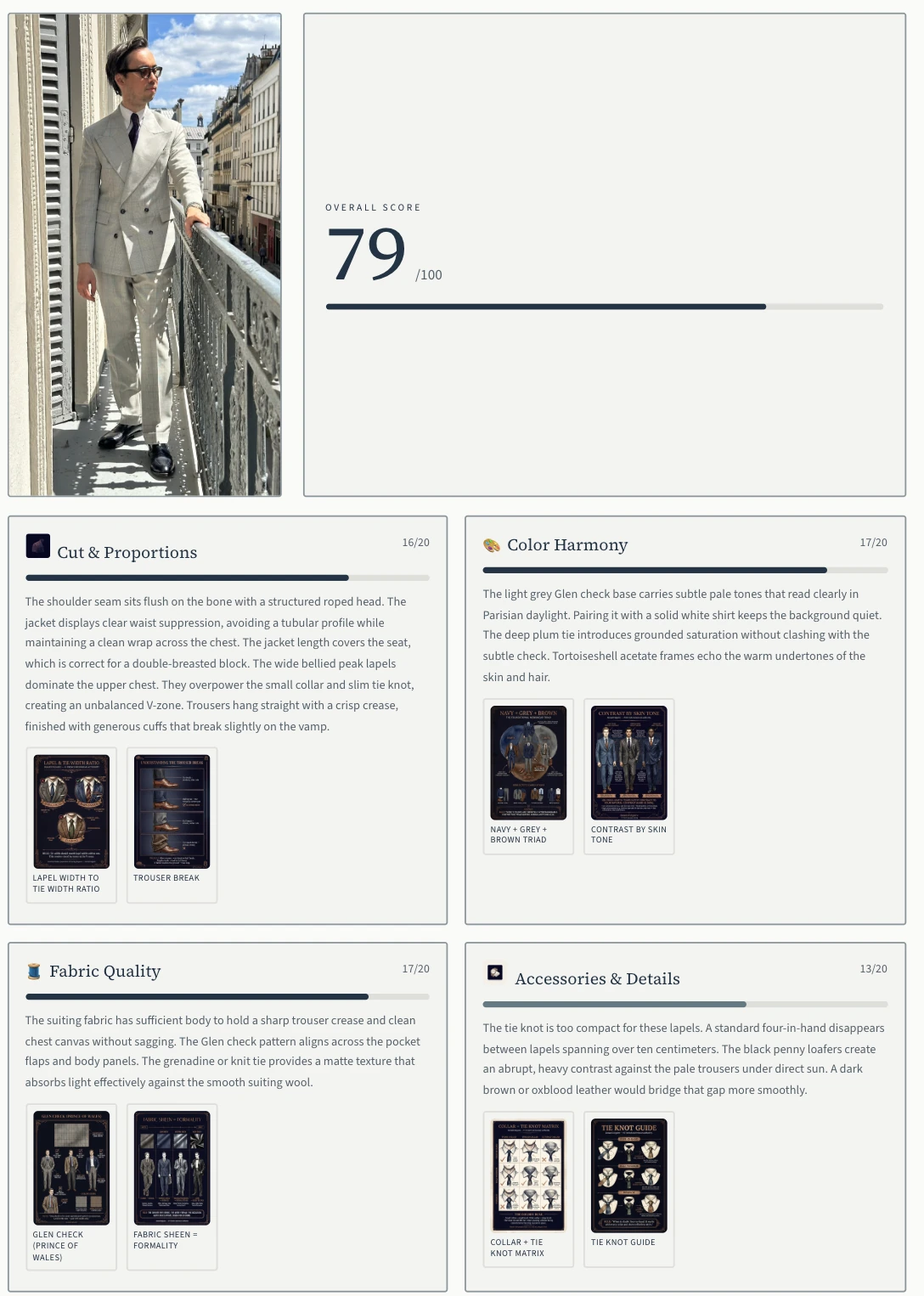
Style Rater result: outfit photo and advice on proportions, colours, fabric and accessories.
Understand what works and what needs adjusting.

The result notes a well-placed shoulder, but a tie knot that is too understated for the lapels and shoes with a strong contrast. The advice matters more than the score.

Style Rater · Analyse my outfit

And what about the outfit you are already wearing?

You send
A photo of your outfit, with the occasion and what you would like to improve.
The app examines
Proportions, colours and how well the whole outfit suits that context.
You receive
A score with commentary and concrete adjustments, with one recommendation to address first.

You do not need to have filled your wardrobe. Here, you are asking for an opinion on an existing outfit, not a new combination.

Intelligence · One piece, several outfits

Discover other ways to wear a piece.

Always wearing the same clothes together? Start with one piece and find other possible combinations.

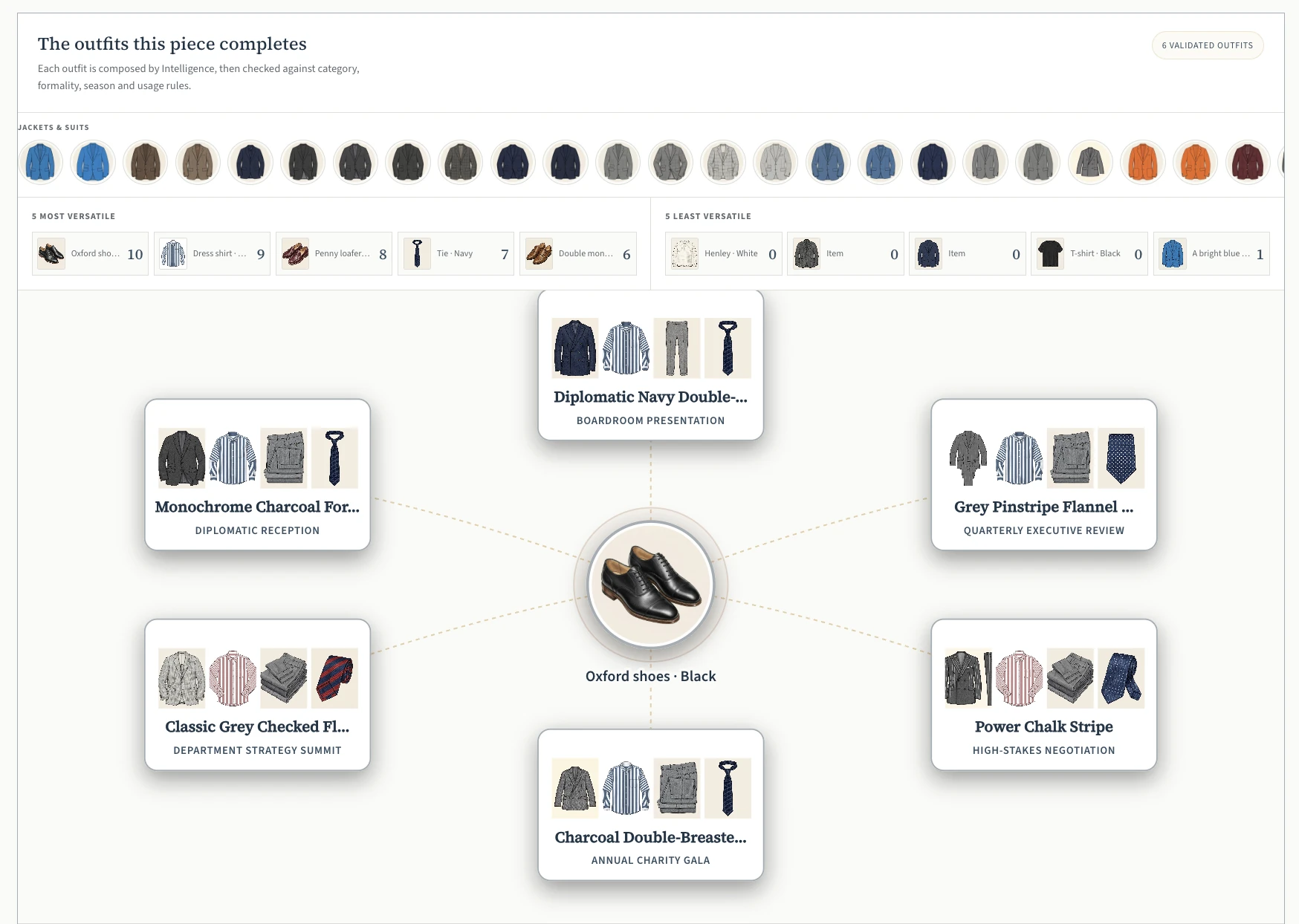
Intelligence connects a pair of black Oxfords to six validated outfits, with their clothes and occasions.
The same Oxfords, six validated outfits.

Here, the same black Oxfords appear in six validated outfits. The graph shows which clothes they are paired with and for which occasions.

What else could you wear these shoes with?

Start with one piece
Here, the black Oxfords from the wardrobe. Around them, you can find the outfits that use them.
Compare the outfits
Each combination shows the accompanying clothes and the intended occasion.
Choose for your day
Pick out a suitable outfit and find the pieces in your wardrobe.
See how to organise your wardrobe

Inspirations · From concept to your outfits

Adapt an inspiration with your own clothes.

Import a look, understand its balance, then create outfits with the clothes you own.

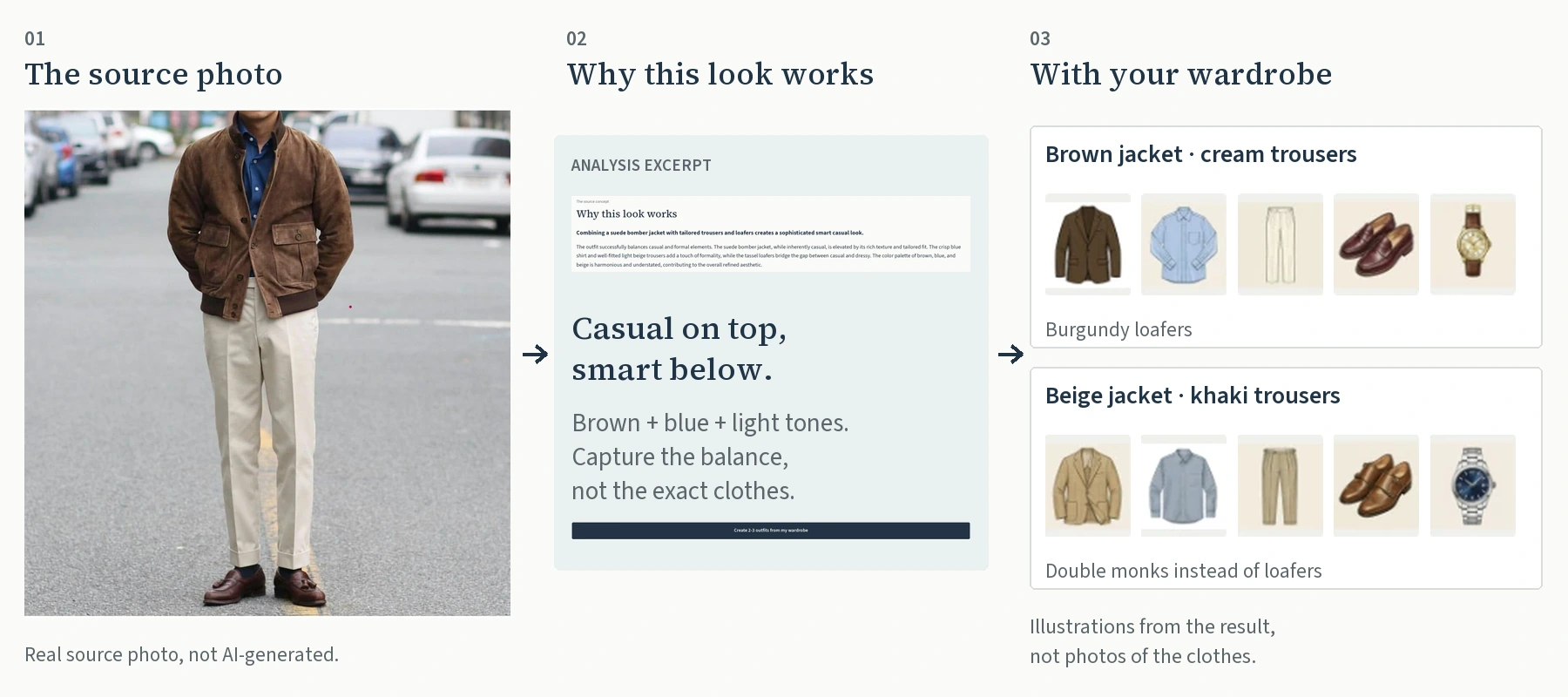
A three-step process: 1. Imported photo with a brown blouson, blue shirt, light trousers and loafers. 2. The concept: casual on top, dressier below, in brown, blue and light tones. 3. Two new outfits using the wardrobe: a brown jacket with cream trousers, or a beige jacket with khaki trousers. The pieces are extracted from the result screenshot, with no new generation.
The look → the concept → your outfits.

The source outfit is not generated. Cropped screenshots; the clothes are illustrations, not photographs.

Text and montage in English; the original screenshots remain in English.

View the three originals and how it works in detail
  1. Import an outfit you like

    Add an outfit screenshot or a public link, then request the analysis. The photo remains your inspiration, not a generated outfit.

  2. Understand the source concept

    “Source concept” explains “Why this look works” and the principles to adapt. Here: the balance between a casual blouson and dressier pieces. The shirt and trouser fabrics remain uncertain.

  3. Create your outfits from the concept

    Click “Create 2 to 3 outfits with my wardrobe”. Two outfits recomposed with wardrobe pieces are shown here. The app suggests new combinations, not just similar pieces, and does not simply retrieve old outfits. In the second, double monk straps replace the loafers. Compare the adaptations, then save or discard each outfit.

The number of outfits depends on the pieces available: two to three is a target, not a guarantee. Fit and drape still need to be checked by trying the clothes on. The source of the advice is stated; it does not constitute validation by JamaisVulgaire.

Purchases

See possible outfits before you buy.

You like a piece. The question is what you will wear it with.

  1. Add the product you are considering

    Paste its link, upload a photo or describe it. Save at least two pieces in your wardrobe to match against the purchase.

  2. Request combinations

    The app looks for clothes in your wardrobe to wear with this piece, then explains the suggested combinations.

  3. Distinguish what you own from what is missing

    Outfits using your pieces are separated from those that would require an addition. The product being tested is not added to your possessions.

You receive outfit ideas, not a virtual try-on. Fit still needs checking.

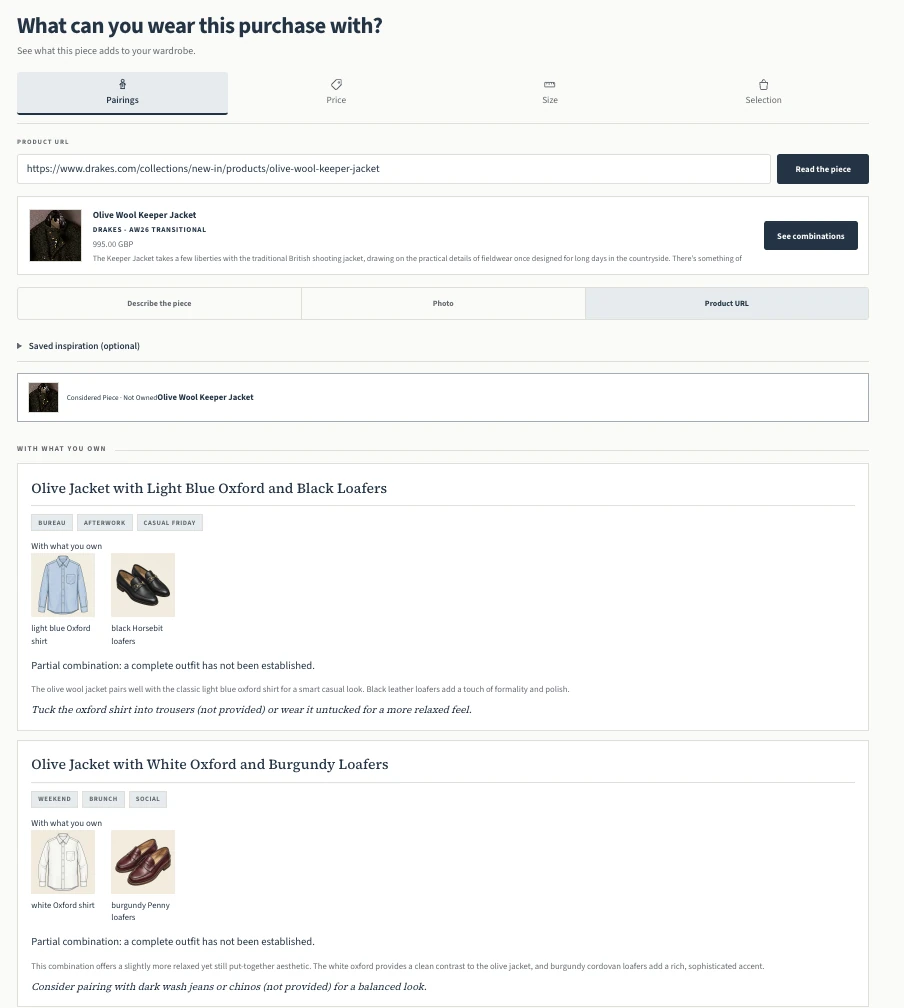
Purchase simulation for an olive Drake’s jacket: two combinations with shirts and loafers from the wardrobe, marked as partial.
Before buying, see what you will wear it with.

You are considering this olive jacket. The app suggests pairing it with your blue shirt and black loafers, or your white shirt and burgundy loafers. It has not identified trousers to wear with them, so it marks these combinations as partial.

Is the price right?

The analysis uses the available information to help you assess the price. It does not guarantee a bargain.

Price analysis

Which size should you choose?

Use your sizing references to find your way between brands. Help with choosing, not a substitute for trying on.

Size comparisons

Packing

What will you wear on your trip?

A wedding does not call for the same clothes as a hike or a city break. Specify your activities to prepare your luggage with pieces from your wardrobe.

  1. Describe the trip

    Destination, dates and activities provide the context. Available weather information supplements these details.

  2. Choose your luggage

    Enter the dimensions and desired fill level, select at least one bag, then create the trip.

  3. Request the packing plan

    A separate action starts the preparation: outfits by activity, a list of pieces and their distribution across bags, with an estimated fill level.

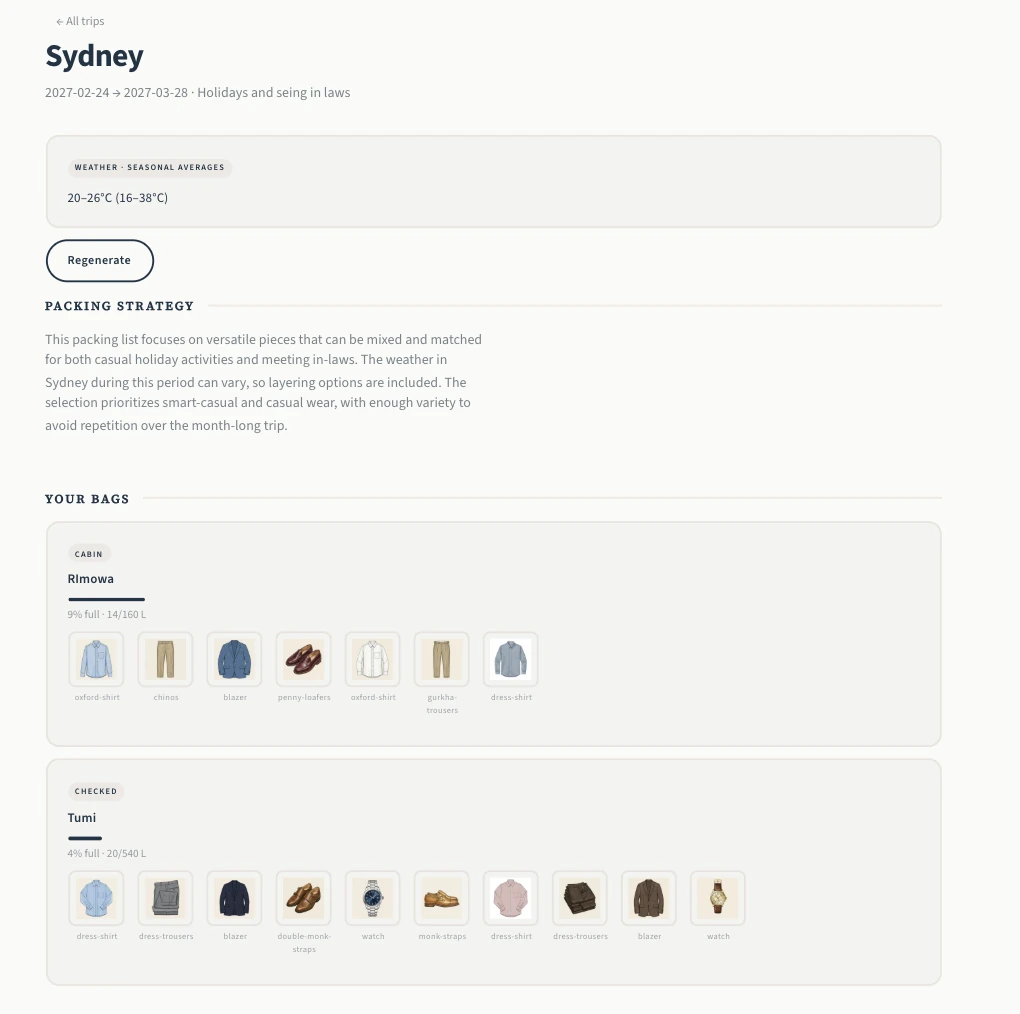
Packing plan for Sydney, from 24 February to 28 March: trip context, seasonal temperatures and clothes divided between two bags.
The clothes for the trip, divided between two bags.

Sydney, from 24 February to 28 March: the app selects clothes for the trip and divides them between two bags. At that distance in time, the temperatures shown are seasonal averages, not weather forecasts.

Wardrobe · Pieces, outfits and gaps

Keep your clothes and outfits at hand.

Find a combination you like or the details of a piece. The gap audit also helps you identify what is missing.

In Wardrobe: Pieces · Outfits · Analysis · Gaps. The screenshots are in English; the captions explain in English what each result helps you decide.

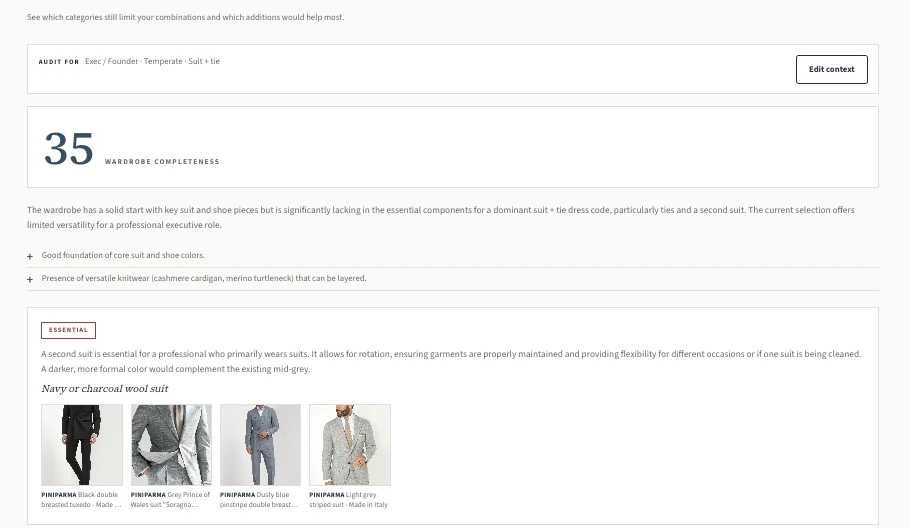
Gap audit: a second navy or charcoal suit is recommended, with an explanation of its usefulness.
Identify what you actually need.

This suit-and-tie audit recommends a second suit as the priority. It explains why: to alternate rather than always wear the same one.

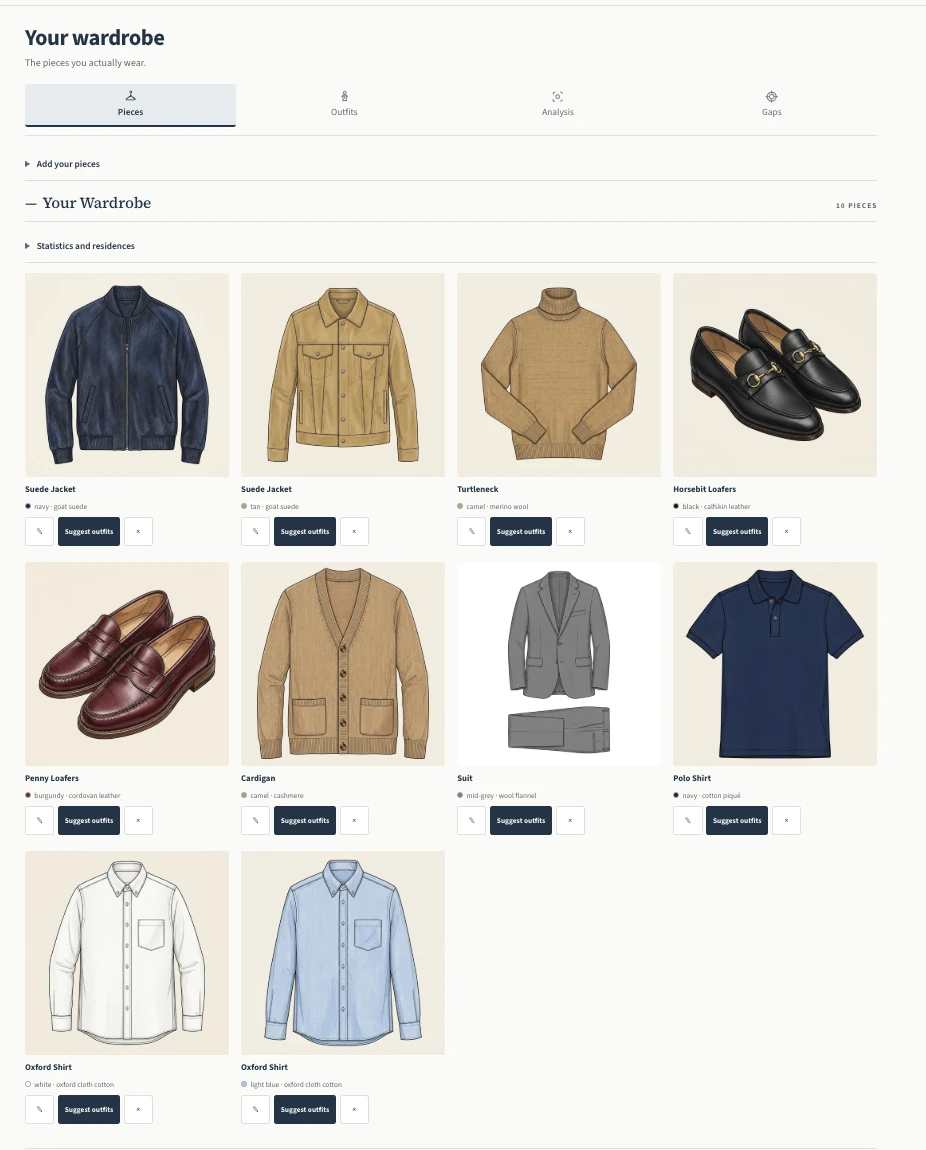
A populated personal wardrobe: ten items with their visuals, including jackets, knitwear, shirts and loafers.
Find your clothes and make better use of them.

Find your clothes with their colour, fabric and image, without having to reconstruct your wardrobe from memory.

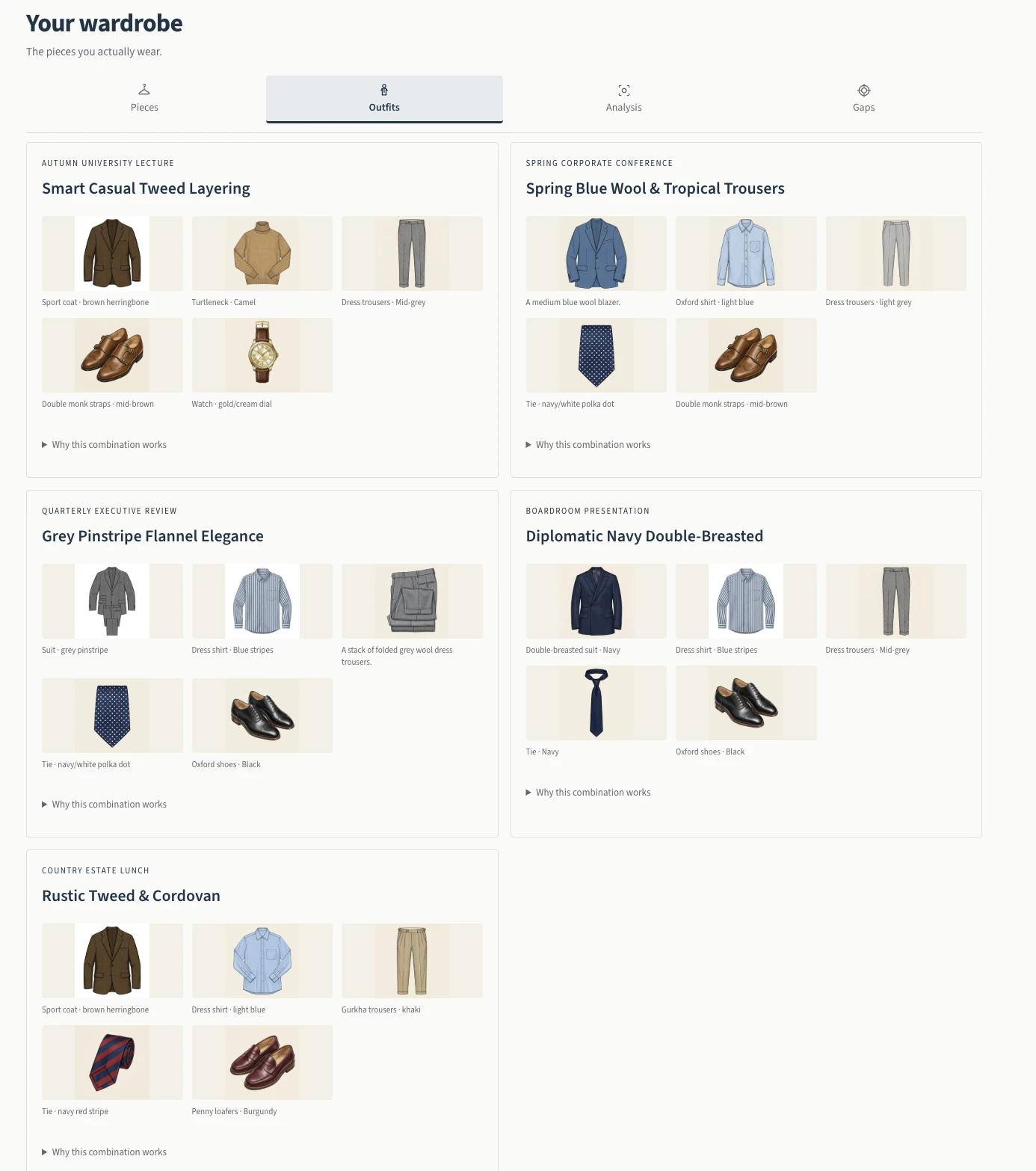
Outfits tab: five combinations and their contexts, including a conference, a presentation and lunch in the countryside.
Keep good combinations within reach.

Distinct combinations for a conference, a presentation or lunch in the countryside. Each card brings together the pieces and the context in which to wear them.

Explore the plans

Tailoring · Fabric suggestions

Arrive at the tailor with a clear project.

Prepare your fabric and cut choices before the appointment. The suggestions are a starting point for discussion with your tailor, not a ready-to-make pattern.

  1. Choose the garment and add your photo

    The photo is required for the analysis. Specify the occasion, budget and your preferences; your profile can still be edited.

  2. Request your advice

    Compare the suggested fabrics, their composition, weight and weave, along with the cut recommendations.

  3. Prepare for the appointment

    When a fabric from the catalogue suits you, select it to export the brief as a PDF and take it to your tailor.

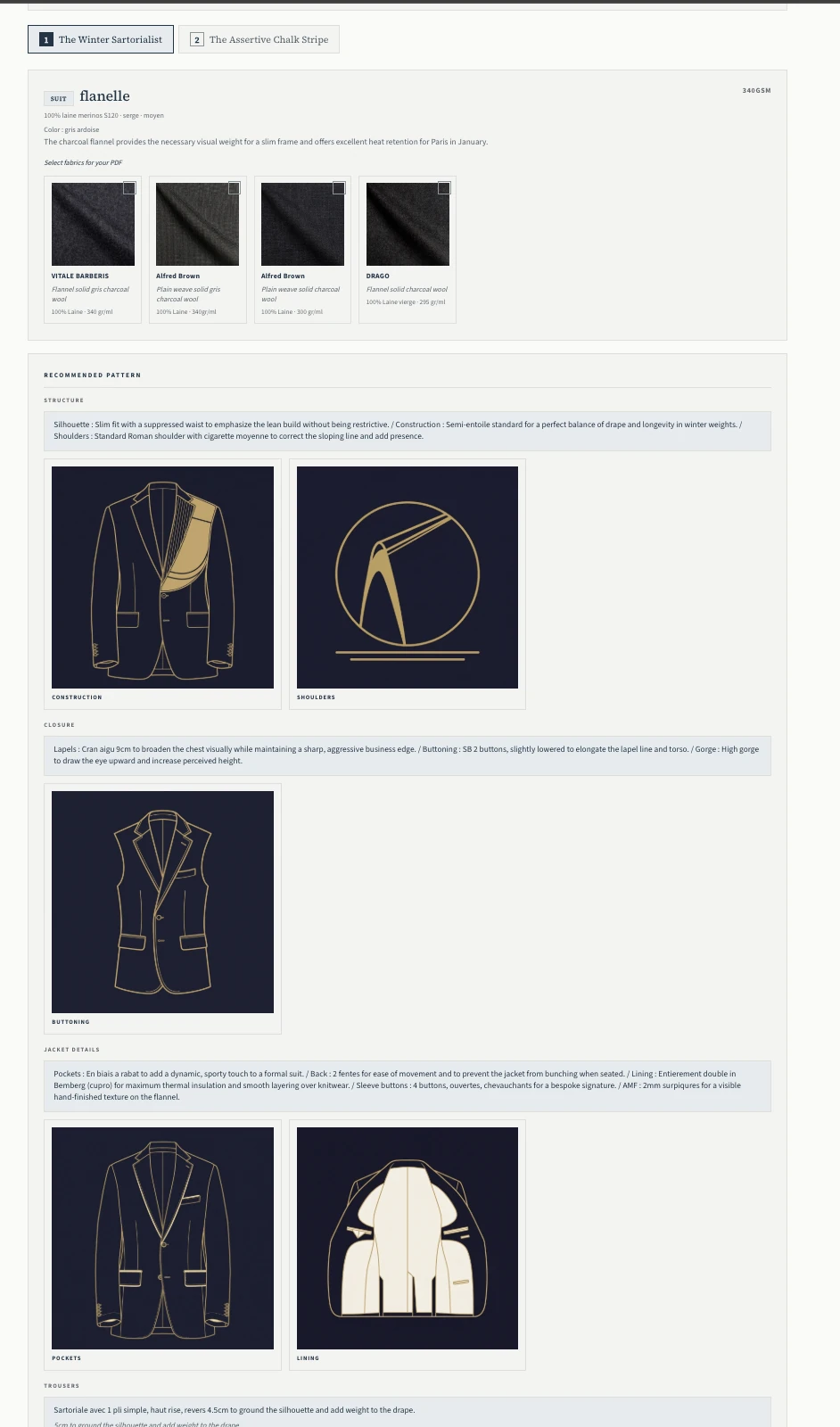
Tailoring result: 340 g/m² charcoal merino wool flannel, catalogue swatches and advice on construction, shoulders and lapels.
A flannel for a winter project.

For a stay in Paris in January, this suggestion favours a 340 g/m² charcoal flannel. The app explains the choice of weight for warmth and how the fabric holds its shape, then presents catalogue references and cut advice.

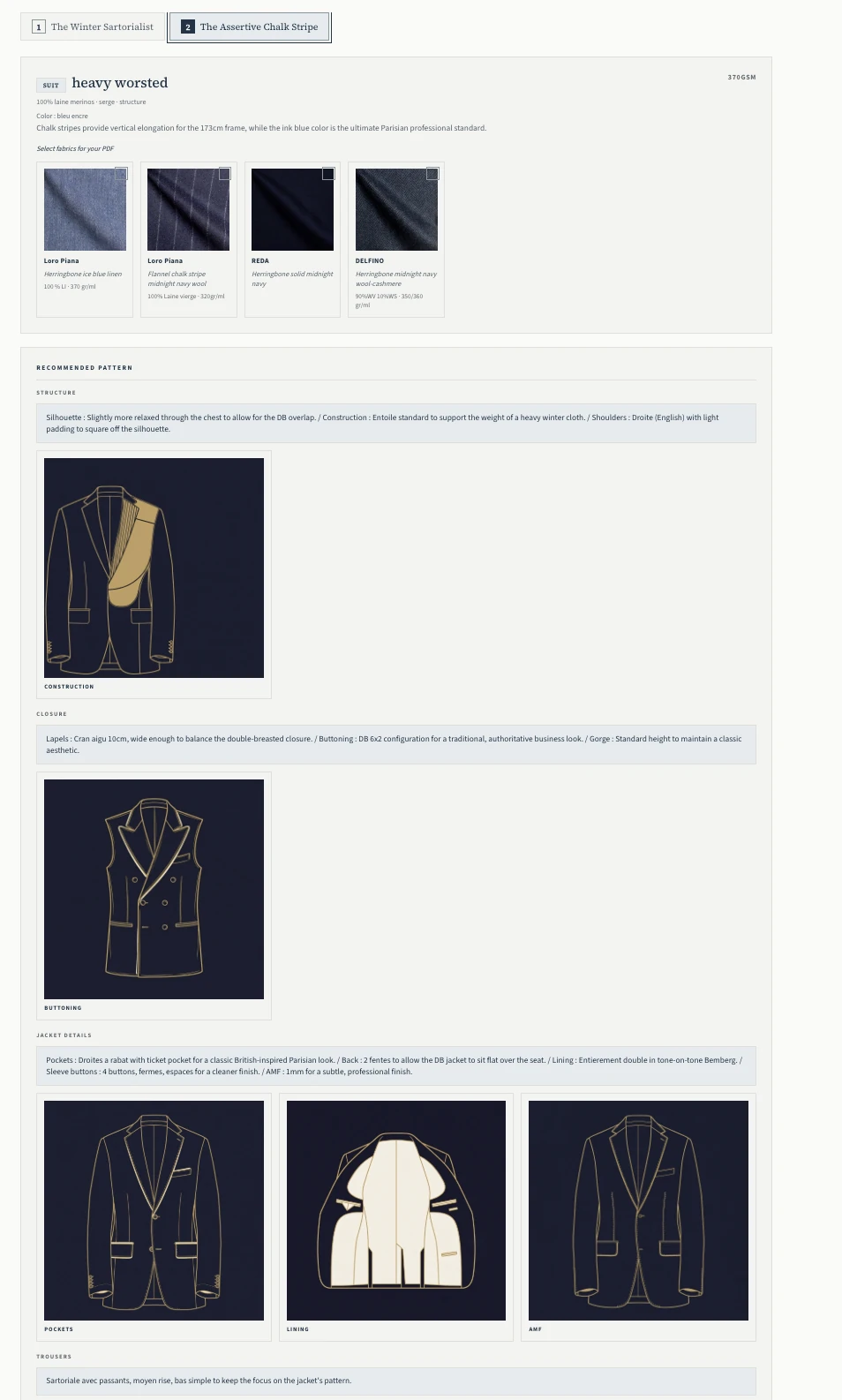
Second tailoring suggestion: 370 g/m² navy worsted wool, a chalk-stripe project, catalogue swatches and advice for a fully canvassed double-breasted jacket.
Compare with a more structured suggestion.

The other suggestion pairs 370 g/m² navy worsted wool with a fully canvassed double-breasted jacket. The app explains, among other things, the choice of chalk stripes for the desired vertical effect. This advice accompanies the suggested fabrics and still needs discussing with the tailor.

Guides

Understand what you choose.

A question about a cut, a brand or a watch? Consult the guides whenever you want to learn more.

Style

Cuts, colours, proportions and combinations.

Brands

The houses, their world and their craft.

Watches

Reference points to help you understand and choose.

The plans

One year or three years,
the same features.

The features shown here, including Style Rater, purchase testing, Packing and Tailoring, are the same in both plans. Style, brand and watch guides are also included.

Annual subscription

€79/year

Annual renewal. You can turn it off at any time and keep access until the end of the paid period.

One payment each year; renewal can be cancelled.

Each plan includes a credit allowance for generations. You can check your balance in your account.

Full refund on request within 14 days of purchase. Read the conditions ↓

Before you start

A few useful answers.

Where should I start with all these features?

If you want an opinion on what you are wearing, start with a photo in Style Rater. To find what to wear tomorrow, add your first pieces to the wardrobe and request an outfit.

The other tools address occasional needs: testing a purchase, preparing a trip or choosing fabric at the tailor. You can use them when the question arises.

Do I need to add my entire wardrobe?

No. Add at least three pieces to request an outfit, then build up your wardrobe gradually. The relevance of the suggestions depends, in particular, on the clothes and information available.

Will I receive an outfit automatically?

No. You request a suggestion for today or tomorrow in Outfit. Weather and calendar information are optional contexts, used when available. This is not an automatic delivery or notification.

How do credits work?

Generations use the credits allocated to your account. Check your balance and allowance in the app. Neither plan promises unlimited generations.

Can I cancel or request a refund?

For the annual subscription: You may request cancellation and a full refund within 14 days of purchase. After that, the subscription is billed annually on its anniversary date. You can turn off renewal at any time; your access remains active until the end of the paid period.

For any request: contact@jamaisvulgaire.com

Read the terms of service